蓑谷千凰彦先生『線形回帰分析』の感想文
はじめに
数理統計の入門書を一通り読み終えて、実践的な分析手法として線形回帰分析に関心を抱きました。信頼できる知人から薦められたこともあり、蓑谷千凰彦先生の『線形回帰分析』を読み始めました。
線形回帰分析について多くを学ぶことができたのですが、あまり本書が紹介されている場面を見掛けないため、かつての自分のように線形回帰分析に関心を持ち始めた方に向けて感想文を残しておきます。
本書の位置付けと対象読者
本書の「はじめに」には次のように書かれています。
本書は入門書であるが, 線形回帰分析の技術的な手続きのみを示した書ではない. 統計理論についても可能な限り証明も省略せず, 証明が長くなる, あるいは少し煩瑣な内容は, 各章で数学注として示した.
この方針通り、本書は線形回帰分析を実践するためというよりは、その理論を理解するための書籍です。各章に例題が掲載されていますが、線形回帰分析の実行手順を学ぶためというよりは、理論を理解するための手助けのような役割であると感じます。また、分析を実行するためのプログラミングについての記載は一切ありません。
また、「入門書」とされていますが、基礎的な数理統計の知識は前提としているようです。例えば「中心極限定理」「フィッシャー情報行列」「尤度比検定」などの用語は特に説明なく登場します。
さらに、その前提となる微積分や行列計算の知識も求められます。恥ずかしながら、私は行列計算には不安を抱えたまま読んでいました。特に行列の幾何的な意味は分からないままだったので、きちんと学んでから読み直したらまだまだ多くの発見がありそうだと思っています。
本書の構成
目次は朝倉書店のWebサイトに掲載されていますが、全体を大きくまとめると前半と後半に分かれます。
目次(クリックで展開)
まえがき
1単純回帰モデルのパラメータ推定
 1.1 はじめに
 1.2 単純回帰モデル
 1.3 正規線形回帰モデルの諸仮定
 1.4 パラメータ推定
  1.4.1 散布図
  1.4.2 最小2 乗法による, の推定
  1.4.3 ρ²の推定
 1.5 自由度とは何か
 1.6 最尤法による, およびρ² の推定
 1.7 プロファイル尤度関数
  1.7.1 βのプロファイル対数尤度関数
  1.7.2 ρ² のプロファイル対数尤度関数
 1.8 定数項なしの単純回帰モデル
 1.9 α,β の 特 性
  1.9.1 α,β はYi の線形関数である
  1.9.2 α,β の分散および共分散
  1.9.3 最小2 乗推定量α,β の特性
 数学注
2単純回帰モデルにおける説明力,仮説検定および予測
 2.1 はじめに
 2.2 モデルの説明力
 2.3 決定係数に関する3 つの注意
 2.4 α,β に関する仮説検定
  2.4.1 βに関する検定
  2.4.2 αに関する検定
 2.5 計算の順序
 2.6 ρ²に関する仮説検定
 2.7 有意確率(p 値)
 2.8 パラメータの区間推定
  2.8.1 α,βの信頼区間
  2.8.2 ρ²の信頼区間
 2.9 予 測
  2.9.1 平均予測値と予測区間
  2.9.2 点予測値と予測区間
 数学注
3重回帰モデルのパラメータ推定と説明力
 3.1 はじめに
 3.2 重回帰モデル
 3.3 未知パラメータの推定― 最小2 乗法
 3.4 最小2 乗残差の性質
 3.5 ρ² の 推 定
 3.6 βの共分散行列の推定
 3.7 未知パラメータの推定―最尤法
 3.8 偏回帰係数推定量の意味
 3.9 F W L の定理
 3.10 ダ ミ ー 変 数
  3.10.1 質的属性の代理変数
  3.10.2 季節ダミー
 3.11 モデルの説明力
  3.11.1 決定係数
  3.11.2 自由度修正済み決定係数
  3.11.3 AIC, SBIC, GCV およびHQ
 3.12 偏回帰作用点プロット
 3.13 パラメータ推定量の特性
  3.13.1 βの特性
  3.13.2 s² の特性
 3.14 最尤推定量MLE の特性
 3.15 多重共線性
 数学注
4重回帰モデルにおける仮説検定と予測
 4.1 はじめに
 4.2 βj=0 の検定
 4.3 βに関する線形制約の検定
  4.3.1 線形制約
  4.3.2 R βからの接近
  4.3.3 制約つき最小2 乗推定量からの接近
 4.4 βの信頼域
 4.5 β に関する仮説検定
 4.6 R β=r の信頼域
 4.7 ρ²に関する仮説検定
 4.8 ρ²の信頼区間
 4.9 予測と予測区間
  4.9.1 平均予測値と予測区間
  4.9.2 点予測値と予測区間
 4.10 デルタ法
  4.10.1 1 変量のケース
  4.10.2 2 変量のケース
  4.10.3 重回帰モデルとデルタ法
 数学注
5 定式化テスト
 5.1 はじめに
 5.2 非ゼロの期待値をもつ誤差項
  5.2.1 βへの影響
  5.2.2 s² への影響
  5.2.3 系統的要因欠落による定式化の誤り
  5.2.4 不適切な説明変数追加による定式化の誤り
 5.3 定式化ミスのテスト― RESET テスト
 数学注
6  不均一分散
 6.1 はじめに
 6.2 不 均 一 分 散
 6.3 O L S の結果
 6.4 均一分散の検定
  6.4.1 e-Yˆ プロット
  6.4.2 ブロイシュ・ペーガンテスト(BP テスト)
  6.4.3 ホワイトテスト
  6.4.4 ゴドフライ・コーエンカーテスト
 6.5 分散安定化変換
 6.6 ボックス・コックス変換
  6.6.1 ボックス・コックス変換
  6.6.2 ボックス・コックスモデルの推定
  6.6.3 βの共分散行列
  6.6.4 ボックス・コックス変換における関数形の検定
 6.7 一般化最小2 乗法(GLS)
 6.8 不均一分散のもとでのvar( )の一致推定量
 数学注
7自 己 相 関
 7.1 はじめに
 7.2 1 階の自己回帰過程AR(1)
 7.3 OLS の結果
 7.4 自己相関AR(1)の検定
  7.4.1 残差のグラフを描く
  7.4.2 ダービン・ワトソン検定
  7.4.3 ダービン・ワトソン検定の問題点
  7.4.4 m テスト
  7.4.5 h 統計量
 7.5 パラメータ推定― 一般化最小2 乗法
 7.6 実行可能なGLS
  7.6.1 2 SPW
  7.6.2 GLS―格子探索法
 7.7 パラメータ推定―最尤法
  7.7.1 尤度関数と必要条件
  7.7.2 最尤法―格子探索法
  7.7.3 最尤法―ビーチ・マッキノン法
 7.8 見せかけの回帰
 数学注
数学付録
 A1 クラメール・ラオCramér-Rao の不等式
 A2 クラメール・ラオ不等式の一般化
 B 行列とベクトルの微分
 C 跡trace の定義と性質
 D 分割行列の逆行列
 E 固有値と固有ベクトル
 F 対称行列の変換
 G 正規確率変数の2 次形式の分布
 H 正規確率変数の関数の独立
 I カーネル密度関数
参考文献
付表
索   引
前半の第1~4章では、行列を用いて最小二乗推定量の性質や重回帰分析の構造が解説されています。例えば第3章では、単位行列やハット行列を用いたFWLの定理(Frisch–Waugh–Lovellの定理)によって、偏回帰係数推定量やダミー変数の意味が示されます。これまで「そういうもの」と知識でしかなかったものの理解が進み、データの特徴が推定量にどのような影響を与えるのかが見えるようになってきました。
第3章の最後では、多重共線性についても触れられています。比較的新しい(2015年刊)こともあり、線形回帰分析の類書である佐和隆光先生の『回帰分析』では触れられなかったVIF(Variance Inflation Factor)も登場します*1。ただし、多重共線性への対処については深入りせず、Ridge回帰が紹介されるものの、「決定的な解決にはならないことが多い.」と簡潔に述べられています。
後半の第5~7章では、線形回帰分析の仮定が崩れた場合を扱います。「誤差項の期待値ゼロ」「均一分散」「自己相関無し」というそれぞれの仮定について、「仮定が崩れると何が起こるのか」「仮定をどのように検証するのか」「仮定が崩れている場合、どのように対処するのか」が解説されます。私はこれまで、なぜか多重共線性にばかり囚われていましたが、そもそも最小二乗法による線形回帰分析が正しいのかどうか、置かれている仮定をよく検討する必要があることを学びました。
本書の特徴
「はじめに」にも書かれていたように、証明の丁寧さが本書の特徴として挙げられます。これまで統計の専門書を読んでいて、説明や式展開の途中が省略された場合、自明だから省略されたのか、その書籍のレベルを超えているから省略されたのか迷ってしまうことがありました。本書では省略が少なく、長くなる部分は「数学注」として明確に区別されています。また、本書のレベルを超えている部分は、その旨が分かりやすく書かれています。そのため、「自分の理解不足なのか、それとも本書では理解が困難なのか」で悩むことがほとんどありませんでした。
また、本書そのものの特徴ではないのですが、著者である蓑谷千凰彦先生は関連書籍も多数執筆されている点もメリットとして挙げられます。 外れ値や分析結果への影響が強い観測値について扱う『回帰診断』、外れ値の影響をいかに軽減するかがテーマの『頑健回帰推定』、線形回帰分析の枠組みを超えてより広汎なモデルを解説する『一般化線形モデルと生存分析』、などです*2。これらの本が用意されていることで、線形回帰分析からより発展的な内容に接続がしやすい点が特徴の1つです。
結び
本書を通じて、線形回帰分析の偏回帰係数の意味や、置かれている仮定が分析結果に与える影響についての理解が深まりました。 線形回帰分析を手続き的に使うだけでなく、理論的な背景を学ぶことで手に馴染ませて使いたい方に、お薦めできる一冊だと思います。
注釈
*2 ちなみに全て未読。そのうち読みます。
ベイズ構造時系列モデル(bstsパッケージ)の個人メモ
ベイズ構造時系列モデルに触れる機会があったので、調べたことついてメモを残します。
ベイズ構造時系列モデル(BSTS)とは
ベイズ構造時系列モデルとは、ベイズ推定を用いた状態空間モデルで、トレンドや季節性に加え多数の外生変数を柔軟に取り込めるのが特徴である。
英語でBayesian Structural Time Series Modelと表記されるので、BSTSと略される場合が多いみたい。
以下の記事で簡潔に解説されている。
構造時系列モデルは状態空間モデルの一種であり、時系列に存在する異なる成分(トレンドや季節性など)を切り分けて表現することが可能なモデルである。この発展形として、2017年、Steven L. Scottによってトレンドや季節性などの成分に加えて多様な外生変数を取り込むことが可能なベイズ構造時系列モデルが提唱された ※1 。一般的に、時系列データは地点数が少なく(例:月次データが5年分あっても60地点しか存在しない)多量の説明変数を取り込むことを不得手としているが、このベイズ構造時系列モデルでは、“Spike and Slab”型の事前分布 ※2 を説明変数に与え各変数が予測に与える影響度合をベイズ的アプローチで更新していくことで、一部の重要な変数をより採択しやすく、そうでない変数はより採択されにくくしている。結果として、多量の外生変数を投入した際のモデルの安定性を向上させるとともに、どの変数がより重要性が高いのかを確率的に表現することが可能なモデルとなっている。
ベイズ構造時系列モデルを用いた新型コロナウイルスが産業に与える影響の予測 | レポート | 野村総合研究所(NRI)
BSTSの実行
ベイズ構造時系列モデルを実行するR言語のパッケージとして、bstsパッケージが挙げられる。
目的変数yに対して影響のある外生変数と、影響のない外生変数を含んだサンプルデータを作成し、影響のあるものだけを選択できるか実験する。
サンプルデータの生成
bstsを適用するサンプルデータを生成する。
yに影響のある外生変数としてx1_meaningfulとx2_meaningfulの2つ。
yに影響のない外生変数としてx3_noise, x4_noise, x5_noiseの3つ。
トレンド成分(trend)と周期成分(seasonal)も追加している。
# データ生成 ---------------------------------------------------------------------

base::set.seed(2025)

# 観測期間
n    <- 200
time <- 1:n

# 真の係数
beta1 <-  1.0
beta2 <-  1.0


# スパイク変数
# ベースは平均0のノイズ
x1_spike <- stats::rnorm(n, 0, 0.2) |>
  withr::with_preserve_seed()

# イベントが発生する時点
events <- c(70, 90, 140, 190)

# スパイクを付与(+10)
x1_spike[events] <- x1_spike[events] + 10 |>
  withr::with_preserve_seed()


# BSTS用サンプルデータフレーム
df <- dplyr::tibble(
  time = time,
  trend = base::cumsum(stats::rnorm(n, 0, 0.3)) + 0.05 * time, # トレンド成分
  seasonal = 3 * base::sin(2 * base::pi * time / 12), # 周期成分(12周期)
  x1_meaningful = x1_spike, # スパイク変数
  x2_meaningful = (time > 100) * 5 + stats::rnorm(n, 0, 0.1), # time100から先で5上がる変数
  x3_noise = stats::rnorm(n, 10, 3), # 観測値と無関係な変数1
  x4_noise = (time > 120) * 10 + stats::rnorm(n, 0, 0.5), # 観測値と無関係な変数2
  x5_noise = 5 * base::sin(2 * base::pi * time / 6) # 観測値と無関係な変数3
) |>
  dplyr::mutate(
    effect_x1 = beta1 * x1_meaningful, # 真の係数をかける
    effect_x2 = beta2 * x2_meaningful, # 真の係数をかける
    latent_mean = trend + seasonal + effect_x1 + effect_x2, # 観測値yの作成にノイズ変数は使用しない
    y = latent_mean + stats::rnorm(n, 0, 1)   # 観測誤差を加えて観測値を作成
  ) |>
  withr::with_preserve_seed()
サンプルデータの可視化
可視化用のデータフレーム作成
# 可視化 ---------------------------------------------------------------------

# 可視化のための縦持ち
df_long <- df |>
  dplyr::select(time,
                trend,
                seasonal,
                x1_meaningful,
                x2_meaningful,
                x3_noise,
                x4_noise,
                x5_noise,
                effect_x1,
                effect_x2,
                y) |>
  tidyr::pivot_longer(cols = -time,
                      names_to = "series",
                      values_to = "value")


# パレット
pals <- scales::hue_pal()(9)
観測値と意味のある変数の関係を可視化。
黒線の観測値yが、その他の変数の線形結合になっていることが分かる。
df_long |>
  dplyr::filter(series %in% c("y",
                              "trend",
                              "seasonal",
                              "x1_meaningful",
                              "x2_meaningful")) |>
  ggplot2::ggplot() +
  ggplot2::aes(x = time,
               y = value,
               colour = series) +
  ggplot2::geom_line(alpha = 0.7) +
  ggplot2::geom_line( # time170までが学習期間
    data = df_long |> dplyr::filter(series == "y"),
    colour = "black",
    linewidth = 0.7,
    linetype = "solid") +
  ggplot2::geom_vline( # trainとtestの境目
    xintercept = 171,
    linetype = "longdash",
    colour = "darkgrey") +
  ggplot2::scale_colour_manual(
    values = c(
      "y" = "black",
      "trend" = pals[1],
      "seasonal" = pals[3],
      "x1_meaningful" = pals[5],
      "x2_meaningful" = pals[7])
  )

観測値のノイズ変数の関係を可視化。
各変数と観測値に関係が無さそうなことが分かる。
df_long |>
  dplyr::filter(series %in% c("y",
                              "x3_noise",
                              "x4_noise",
                              "x5_noise")) |>
  ggplot2::ggplot() +
  ggplot2::aes(x = time,
               y = value,
               colour = series) +
  ggplot2::geom_line(alpha = 0.7) +
  ggplot2::geom_line( # time170までが学習期間
    data = df_long |> dplyr::filter(series == "y"),
    colour = "black",
    linewidth = 0.7,
    linetype = "solid") +
  ggplot2::geom_vline( # trainとtestの境目
    xintercept = 170,
    linetype = "longdash",
    colour = "darkgrey") +
  ggplot2::scale_colour_manual(
    values = c(
      "y" = "black",
      "x3_noise" = pals[2],
      "x4_noise" = pals[6],
      "x5_noise" = pals[8])
  )

BSTS実行と要約統計量
trainとtestに分けて、bstsを実行。
# train_test_split --------------------------------------------------------

# 学習と予測の境界(学習の最終時点)
split_point <- 170

train <- df |> dplyr::filter(time <= split_point)
test  <- df |> dplyr::filter(time > split_point)


# BSTS実行 ------------------------------------------------------------------

# 状態成分: ローカル線形トレンド + 季節(12)
state_spec <- list()
state_spec <- bsts::AddLocalLinearTrend(state_spec, train$y)
state_spec <- bsts::AddSeasonal(state_spec, train$y, nseasons = 12)

# 学習(MCMC)
model <- bsts::bsts(
  formula = y ~ x1_meaningful + x2_meaningful + x3_noise + x4_noise + x5_noise,
  state.specification = state_spec,
  data   = train,
  niter  = 10000,
  seed = 2025
)
要約統計量(後述)
# 要約統計量
summary(model)

# $residual.sd
# [1] 0.8785867
#
# $prediction.sd
# [1] 1.273161
#
# $rsquare
# [1] 0.9476483
#
# $relative.gof
# [1] 0.7652265
#
# $size
# Min. 1st Qu.  Median    Mean 3rd Qu.    Max.
# 2.000   2.000   2.000   2.108   2.000   4.000
#
# $coefficients
# mean          sd    mean.inc     sd.inc   inc.prob
# x2_meaningful  0.7646377308 0.147692157  0.76463773 0.14769216 1.00000000
# x1_meaningful  1.0642648209 0.055951476  1.06426482 0.05595148 1.00000000
# x5_noise       0.0208515663 0.088777119  0.30065410 0.17189628 0.06935401
# x4_noise      -0.0027816861 0.020538373 -0.10940168 0.07031384 0.02542636
# x3_noise       0.0004193597 0.004924699  0.03169769 0.02912294 0.01322997
# (Intercept)    0.0000000000 0.000000000  0.00000000 0.00000000 0.00000000
状態成分の可視化。
トレンド成分、周期成分、回帰成分を抽出できている。
# 状態成分
bsts::plot.bsts(model, "components")

包含確率の可視化。色が濃いのは負の値。
ノイズ変数がほぼ0になっている。
# 包含確率
bsts::plot.bsts(model, "coefficients")

予測
# 予測 ----------------------------------------------------------------------

pred <- predict(model,
                horizon = nrow(test),
                newdata = test,
                burn = 1000,
                seed = 2025)

plot(pred)

予測値と実測値を合わせて可視化
df_res <- data.frame(
  time = df$time,
  actual = df$y,
  pred_mean = c(rep(NA, nrow(train)), pred$mean),
  pred_lower = c(rep(NA, nrow(train)), pred$interval["2.5%", ]),
  pred_upper = c(rep(NA, nrow(train)), pred$interval[ "97.5%", ])
)


# 可視化
df_res |>
  ggplot2::ggplot() +
  ggplot2::aes(x = time) +
  # 信用区間
  ggplot2::geom_ribbon(
    data = dplyr::filter(df_res, time > split_point),
    ggplot2::aes(ymin = pred_lower, ymax = pred_upper),
    alpha = 0.4, fill = "darkgrey"
  ) +
  # 実測値
  ggplot2::geom_line(
    ggplot2::aes(y = actual),
    colour = "black",
    linewidth = 0.6
  ) +
  # 予測値
  ggplot2::geom_line(
    data = dplyr::filter(df_res, time > split_point),
    ggplot2::aes(y = pred_mean),
    colour = "black",
    linewidth = 0.9,
    linetype = "dashed"
  ) +
  # 学習/予測の境界線
  ggplot2::geom_vline(xintercept = split_point + 1,
                      linetype = "longdash",
                      colour = "darkgrey")

モデルの要約統計量
学習結果のオブジェクトを、summary関数に入れた結果がモデルの要約統計量。
表示される各項目について整理する。
residual.sd
観測誤差の標準偏差。
値が小さいほどモデルがデータをよく説明できている。
bsts source: R/summary.bsts.R
prediction.sd
1期先予測誤差の標準偏差。
in-sampleにおいて予測値は算出されている。
in-sampleとは、全データを用いてMCMCで推定したパラメータで、カルマンフィルタによる予測を行ったもの。
一方で、out-of-sampeはある時点(cutpoints)までのデータでパラメータ推定をして、残りのデータに対してカルマンフィルタを実行する。
rsquare
決定係数、のようなものだけどほぼ同じ?
分子が残差平方和ではなく、観測誤差の分散。
bsts/R/summary.bsts.R at master · cran/bsts · GitHub
relative.gof
relative.gofは、モデルが「単純なドリフト付きランダムウォーク」と比べてどれだけ良く説明できているかを測る指標。
ここでの基準モデルは「1期前の値に一定のドリフトを加えたランダムウォーク」であり、その適合度を、一階差分系列の分散を基準に評価している。
通常の決定係数が「残差分散」と「元の系列の分散」とを比較するのに対し、relative.gofは「予測誤差」と「一階差分系列の分散」とを比較している点が異なる。
bsts source: R/summary.bsts.R
size
モデルに含まれた説明変数の数。
bsts source: R/summary.bsts.R
coefficients
回帰係数の事後分布の統計量。
bsts source: R/summary.bsts.R
参考文献
- ベイズ構造時系列モデルを用いた新型コロナウイルスが産業に与える影響の予測 | レポート | 野村総合研究所(NRI)
- bsts: Bayesian Structural Time Series version 0.9.11 from CRAN
- ベイズ構造時系列モデルを推定する{bsts}パッケージを試してみた - 渋谷駅前で働くデータサイエンティストのブログ
- [R] bsts (ベイズ構造時系列モデル) パッケージの使い方 - ill-identified diary
- 基礎からわかる時系列分析 | 技術評論社
rpartの結果をtidyに扱う(変数重要度と分岐情報を取り出す)
『Rユーザのためのtidymodels[実践]入門』を読み進めている。
Rユーザのためのtidymodels[実践]入門 〜モダンな統計・機械学習モデリングの世界:書籍案内|技術評論社
そのtidymodels関係で、決定木モデルを作成するrpartをtidyにするパッケージのお話。
kyphosisデータ
サンプルデータはrpartパッケージのkyphosisデータ。
# https://rdrr.io/cran/rpart/man/kyphosis.html
data(kyphosis, package = "rpart")

kyphosis %>% summary()
# Kyphosis       Age             Number           Start
# absent :64   Min.   :  1.00   Min.   : 2.000   Min.   : 1.00
# present:17   1st Qu.: 26.00   1st Qu.: 3.000   1st Qu.: 9.00
# Median : 87.00   Median : 4.000   Median :13.00
# Mean   : 83.65   Mean   : 4.049   Mean   :11.49
# 3rd Qu.:130.00   3rd Qu.: 5.000   3rd Qu.:16.00
# Max.   :206.00   Max.   :10.000   Max.   :18.00
broomパッケージ
まずはtidymodelsのbroomパッケージの関数について。
主に3つあり、前処理やモデルの実行結果をtidyにするtidy()関数、学習データに予測値と残差を付与するaugment()関数、モデル選択に利用するAICや決定係数を取得するglance()関数。
この記事ではtidy()関数を扱う。
挙動確認のため、試しにtidy()関数をlm()関数の結果に適用。偏回帰係数などがtidyに返ってくる。
lm_fit <- lm(Start ~ Age + Number,
             data = kyphosis)

broom::tidy(lm_fit)
# A tibble: 3 × 5
# term        estimate std.error statistic  p.value
# <chr>          <dbl>     <dbl>     <dbl>    <dbl>
# (Intercept) 16.3       1.54       10.6   7.88e-17
# Age          0.00427   0.00860     0.496 6.21e- 1
# Number      -1.28      0.309      -4.15  8.55e- 5
一方、rpartの結果を渡すとエラーになってしまう。rpartクラスオブジェクトへのメソッドは無い、と。
fit_rpart <- rpart::rpart(Kyphosis ~ Age + Number + Start, data = kyphosis)

broom::tidy(fit_rpart)
# Error: No tidy method for objects of class rpart
broomstickパッケージ
そこで出てくるのがbroomstickパッケージ。broomstickとは箒の柄のこと。
broomstick.njtierney.com
2023年1月21日時点でCRANに登録されていないので、GitHubからいただいてくる。
このパッケージのtidy()関数を適用すると、変数重要度が返ってくる。
remotes::install_github("njtierney/broomstick")

broomstick::tidy(fit_rpart)
# A tibble: 3 × 2
# variable importance
# <chr>         <dbl>
# Start          8.20
# Age            3.10
# Number         1.52
tidyrulesパッケージ
また、別のrpartに使えるパッケージでtidyrulesというものもある。 talegari.github.io
このパッケージのtidyRules()関数を適用すると、分岐情報などの実行結果が返ってくる。
tidyrules::tidyRules(fit_rpart)
# A tibble: 5 × 6
# id LHS                                                  RHS     support confidence  lift
# <int> <chr>                                                <chr>     <int>      <dbl> <dbl>
# 1 Start >= 8.5 & Start >= 14.5                         absent       29      0.968  1.22
# 2 Start >= 8.5 & Start < 14.5 & Age < 55               absent       12      0.929  1.18
# 3 Start >= 8.5 & Start < 14.5 & Age >= 55 & Age >= 111 absent       14      0.812  1.03
# 4 Start >= 8.5 & Start < 14.5 & Age >= 55 & Age < 111  present       7      0.556  2.65
# 5 Start < 8.5                                          present      19      0.571  2.72
各変数の内容は以下の通り。
LHS: Rules.RHS: Predicted Class.support: Number of observation covered by the rule.confidence: Prediction accuracy for respective class. (laplace correction is implemented by default)lift: The result of dividing the rule's estimated accuracy by the relative frequency of the predicted class in the training set.
tidyrules/tidyrules_vignette.Rmd at master · talegari/tidyrules · GitHub
通常分岐情報を取得するには、以下のように内部変数にアクセスする必要があるところを楽にしてくれている。
rpart:::labels.rpart(fit_rpart,
                     minlength = 0)
# [1] "root"        "Start>=8.5"  "Start>=14.5" "Start< 14.5" "Age< 55"
# [6] "Age>=55"     "Age>=111"    "Age< 111"    "Start< 8.5"

partykit::as.party(fit_rpart) %>%
  partykit:::.list.rules.party() %>%
  stringr::str_replace_all(pattern = "\\\"","'") %>%
  stringr::str_remove_all(pattern = ", 'NA'") %>%
  stringr::str_remove_all(pattern = "'NA',") %>%
  stringr::str_remove_all(pattern = "'NA'") %>%
  stringr::str_squish()
# [1] "Start >= 8.5 & Start >= 14.5"
# [2] "Start >= 8.5 & Start < 14.5 & Age < 55"
# [3] "Start >= 8.5 & Start < 14.5 & Age >= 55 & Age >= 111"
# [4] "Start >= 8.5 & Start < 14.5 & Age >= 55 & Age < 111"
# [5] "Start < 8.5"
結びに
分岐情報取得の話は以前書いた。
rpartの決定木から分岐情報を取り出す - データ分析関連メモ(メモです)
スライドはこちら。
speakerdeck.com
以上

rsample::sliding_window()関数の引数
『Rユーザのためのtidymodels[実践]入門』を読み始めた。
Rユーザのためのtidymodels[実践]入門 〜モダンな統計・機械学習モデリングの世界:書籍案内|技術評論社
第1章で時系列データを分析データと検証データに分割する関数rsample::sliding_window()関数の説明がある。
この関数の引数について自分向けに整理。
まずはデータの読み込み。データは参考書と同様。分割の仕方がわかり易いようにindexを追加している。
"S4248SM144NCEN"という販売量が入っている列名は、FRED(Federal Reserve Economic Data)のコードを意味しているのかもしれない。
Merchant Wholesalers, Except Manufacturers' Sales Branches and Offices: Nondurable Goods: Beer, Wine, and Distilled Alcoholic Beverages Sales (S4248SM144NCEN) | FRED | St. Louis Fed
data(drinks, package = "modeldata")

drinks_annual <- drinks %>%
  dplyr::mutate(year = lubridate::year(date)) %>%
  dplyr::filter(dplyr::between(year, 1992, 1994)) %>%
  dplyr::mutate(index = dplyr::row_number(x = date))

drinks_annual %>%
  head()
# date       sales  year index
# <date>     <dbl> <dbl> <int>
# 1992-01-01  3459  1992     1
# 1992-02-01  3458  1992     2
# 1992-03-01  4002  1992     3
# 1992-04-01  4564  1992     4
# 1992-05-01  4221  1992     5
# 1992-06-01  4529  1992     6
次にsliding_window()の基本的な使い方について。
先ず、rsample::initial_time_split()関数をデータに適用して、rsplitクラスのオブジェクト(drinks_split_ts2)を取得する。
次に、rsplitクラスのオブジェクトにrsample::training()関数を適用して学習データ(train_ts_data2)を参照する。
drinks_split_ts2 <- drinks_annual %>%
  rsample::initial_time_split(prop = 0.68)

train_ts_data2 <- drinks_split_ts2 %>%
  rsample::training()
この学習データ(train_ts_data2)にrsample::sliding_window()関数を適用すれば分析データと検証データに分割できるのだが、
この分割方法をrsample::sliding_window()関数の引数で指定することになる。
rsample::sliding_window()関数の引数は以下の通り(書籍から引用)。
lookbackが分析セット、assess系の2つは検証セットの操作をしている。
lookback……分析セットの件数(時系列の起点となる地震を含まない件数)
assess_start……検証セットの時系列上での起点
assess_stop……検証セットの時系列上での終点
引数のデフォルト値はそれぞれ0,1,1となっている。
Time-based Resampling — slide-resampling • rsample
sliding_window(
data,
...,
lookback = 0L,
assess_start = 1L,
assess_stop = 1L,
complete = TRUE,
step = 1L,
skip = 0L
)
ここから、引数に様々な値を与えて出力結果を確認していく。
デフォルトのまま実行すると、分析データは最初の1件から、検証データは分析データの次の1件で、1つずつずれていく。
fold_default <- rsample::sliding_window(data = train_ts_data2)

rsample::analysis(fold_default$splits[[1]])
# date       sales  year index
# <date>     <dbl> <dbl> <int>
# 1992-01-01  3459  1992     1

rsample::assessment(fold_default$splits[[1]])
# date       sales  year index
# <date>     <dbl> <dbl> <int>
# 1992-02-01  3458  1992     2

rsample::analysis(fold_default$splits[[2]])
# date       sales  year index
# <date>     <dbl> <dbl> <int>
# 1992-02-01  3458  1992     2

rsample::assessment(fold_default$splits[[2]])
# date       sales  year index
# <date>     <dbl> <dbl> <int>
# 1992-03-01  4002  1992     3
lookback = 10とすると、分析データ11件(起点となる1件が足され、10 + 1で11件)、検証データはデフォルトのまま1件。
fold_look10 <- rsample::sliding_window(data = train_ts_data2,
                                       lookback = 10)

rsample::analysis(fold_look10$splits[[1]])
# date       sales  year index
# <date>     <dbl> <dbl> <int>
# 1992-01-01  3459  1992     1
# 1992-02-01  3458  1992     2
# 1992-03-01  4002  1992     3
# 1992-04-01  4564  1992     4
# 1992-05-01  4221  1992     5
# 1992-06-01  4529  1992     6
# 1992-07-01  4466  1992     7
# 1992-08-01  4137  1992     8
# 1992-09-01  4126  1992     9
# 1992-10-01  4259  1992    10
# 1992-11-01  4240  1992    11

rsample::assessment(fold_look10$splits[[1]])
# date       sales  year index
# <date>     <dbl> <dbl> <int>
# 1992-12-01  4936  1992    12

rsample::analysis(fold_look10$splits[[2]])
# date       sales  year index
# <date>     <dbl> <dbl> <int>
# 1992-02-01  3458  1992     2
# 1992-03-01  4002  1992     3
# 1992-04-01  4564  1992     4
# 1992-05-01  4221  1992     5
# 1992-06-01  4529  1992     6
# 1992-07-01  4466  1992     7
# 1992-08-01  4137  1992     8
# 1992-09-01  4126  1992     9
# 1992-10-01  4259  1992    10
# 1992-11-01  4240  1992    11
# 1992-12-01  4936  1992    12

rsample::assessment(fold_look10$splits[[2]])
# date       sales  year index
# <date>     <dbl> <dbl> <int>
# 1993-01-01  3031  1993    13
assess_start = 5とすると、分析データはデフォルトと同様に1件、検証データは分析データの5件あとのindexが6であるレコード1件。
assess_stopはassess_start以上の数値指定しないとエラーになる。
fold_start5 <- rsample::sliding_window(data = train_ts_data2,
                                       assess_start = 5,
                                       assess_stop = 5)

rsample::analysis(fold_start5$splits[[1]])
# date       sales  year index
# <date>     <dbl> <dbl> <int>
# 1992-01-01  3459  1992     1

rsample::assessment(fold_start5$splits[[1]])
# date       sales  year index
# <date>     <dbl> <dbl> <int>
# 1992-06-01  4529  1992     6
assess_start = 5, assess_stop = 10とすると、検証データは分析データから数えて5件目~10件目の6件を取る。
fold_start5_stop10 <- rsample::sliding_window(data = train_ts_data2,
                                       assess_start = 5,
                                       assess_stop = 10)

rsample::analysis(fold_start5_stop10$splits[[1]])
# date       sales  year index
# <date>     <dbl> <dbl> <int>
# 1992-01-01  3459  1992     1

rsample::assessment(fold_start5_stop10$splits[[1]])
# date       sales  year index
# <date>     <dbl> <dbl> <int>
# 1992-06-01  4529  1992     6
# 1992-07-01  4466  1992     7
# 1992-08-01  4137  1992     8
# 1992-09-01  4126  1992     9
# 1992-10-01  4259  1992    10
# 1992-11-01  4240  1992    11
lookback = 10, assess_start = 5, assess_stop = 10とすると、分析データは11件、検証データはそこから5件目~10件目を取る。
fold_look10_start5 <- rsample::sliding_window(data = train_ts_data2,
                                              lookback = 10,
                                              assess_start = 5,
                                              assess_stop = 5)
rsample::analysis(fold_look10_start5$splits[[1]])
# date       sales  year index
# <date>     <dbl> <dbl> <int>
# 1992-01-01  3459  1992     1
# 1992-02-01  3458  1992     2
# 1992-03-01  4002  1992     3
# 1992-04-01  4564  1992     4
# 1992-05-01  4221  1992     5
# 1992-06-01  4529  1992     6
# 1992-07-01  4466  1992     7
# 1992-08-01  4137  1992     8
# 1992-09-01  4126  1992     9
# 1992-10-01  4259  1992    10
# 1992-11-01  4240  1992    11

rsample::assessment(fold_look10_start5$splits[[1]])
# date       sales  year index
# <date>     <dbl> <dbl> <int>
# 1993-04-01  4377  1993    16
日付の途中を補完するtidyr::complete()関数
時系列データでよく使うので備忘録。
まずtidyr::complete()関数の使い方から。
組み合わせの欠損を埋めてくれる関数。
Complete a data frame with missing combinations of data — complete • tidyr
メモ:時系列とか連番のデータを補完するときはtidyrのcomplete()とfull_seq()が便利そう - Technically, technophobic.
サンプルデータを作成する。idが”111”と”222”のデータがあるが、それぞれyear_monthの途中が欠けている。
id“111”は3,5月、”222”は2,3月のレコードが無い。
df_1 <- tibble::tribble(
  ~id, ~year_month, ~cnt,
  "111", "2022-01-01", 1,
  "111", "2022-02-01", 2,
  "111", "2022-04-01", 4,
  "222", "2022-01-01", 1,
  "222", "2022-04-01", 4,
  "222", "2022-05-01", 5,
) |>
  dplyr::mutate(year_month = as.Date(year_month))
seq.Date()関数とtidyr::complete()関数を組み合わせると、補完することができる。
df_1 |>
  tidyr::complete(id,
                  year_month = seq.Date(as.Date(min(year_month, na.rm = TRUE)),
                                        as.Date(max(year_month, na.rm = TRUE)),
                                        by = "months"))

# A tibble: 10 × 3
# id    year_month   cnt
# <chr> <date>     <dbl>
# 1 111   2022-01-01     1
# 2 111   2022-02-01     2
# 3 111   2022-03-01    NA
# 4 111   2022-04-01     4
# 5 111   2022-05-01    NA
# 6 222   2022-01-01     1
# 7 222   2022-02-01    NA
# 8 222   2022-03-01    NA
# 9 222   2022-04-01     4
# 10 222   2022-05-01     5
ここから気になって調べたところ。
seq.Date()関数の始まりと終わりの日付に、元のデータに存在しないものを指定しても、指定した範囲で補完してくれる。
例えば元のサンプルデータには2022年1月から2022年5月までしか存在しないが、seq.Date()関数に2021年12月から2022年6月まで指定すると次のように返ってくる。
df_1 |>
  tidyr::complete(id,
                  year_month = seq.Date(as.Date("2021-12-01"),
                                        as.Date("2022-06-01"),
                                        by = "months"))

# A tibble: 14 × 3
# id    year_month   cnt
# <chr> <date>     <dbl>
# 1 111   2021-12-01    NA
# 2 111   2022-01-01     1
# 3 111   2022-02-01     2
# 4 111   2022-03-01    NA
# 5 111   2022-04-01     4
# 6 111   2022-05-01    NA
# 7 111   2022-06-01    NA
# 8 222   2021-12-01    NA
# 9 222   2022-01-01     1
# 10 222   2022-02-01    NA
# 11 222   2022-03-01    NA
# 12 222   2022-04-01     4
# 13 222   2022-05-01     5
# 14 222   2022-06-01    NA
完全に範囲外の1900年の日付を指定すると、その範囲だけ組み合わせが発生する。
元々存在していた2022年のレコードは変わらず。
df_1 |>
  tidyr::complete(id,
                  year_month = seq.Date(as.Date("1900-01-01"),
                                        as.Date("1900-02-01"),
                                        by = "months"))

# A tibble: 10 × 3
# id    year_month   cnt
# <chr> <date>     <dbl>
# 1 111   1900-01-01    NA
# 2 111   1900-02-01    NA
# 3 222   1900-01-01    NA
# 4 222   1900-02-01    NA
# 5 111   2022-01-01     1
# 6 111   2022-02-01     2
# 7 111   2022-04-01     4
# 8 222   2022-01-01     1
# 9 222   2022-04-01     4
# 10 222   2022-05-01     5
次に、idとは別に、idに対して紐づいている変数を持っている場合。
サンプルデータとして、各idにnameがあるデータを作成する。
df_2 <- tibble::tribble(
  ~id, ~name, ~year_month, ~cnt,
  "111", "xxx", "2022-01-01", 1,
  "111", "xxx", "2022-02-01", 2,
  "111", "xxx", "2022-04-01", 4,
  "222", "yyy", "2022-01-01", 1,
  "222", "yyy" ,"2022-04-01", 4,
  "222", "yyy", "2022-05-01", 5,
) |>
  dplyr::mutate(year_month = as.Date(year_month))
これをそのままtidyr::complete()に放り込むと、idとnameを含めて、すべての組み合わせが作成される。
df_2 |>
  tidyr::complete(id, name,
                  year_month = seq.Date(as.Date(min(year_month, na.rm = TRUE)),
                                        as.Date(max(year_month, na.rm = TRUE)),
                                        by = "months"))

# A tibble: 20 × 4
# id    name  year_month   cnt
# <chr> <chr> <date>     <dbl>
# 1 111   xxx   2022-01-01     1
# 2 111   xxx   2022-02-01     2
# 3 111   xxx   2022-03-01    NA
# 4 111   xxx   2022-04-01     4
# 5 111   xxx   2022-05-01    NA
# 6 111   yyy   2022-01-01    NA
# 7 111   yyy   2022-02-01    NA
# 8 111   yyy   2022-03-01    NA
# 9 111   yyy   2022-04-01    NA
# 10 111   yyy   2022-05-01    NA
# 11 222   xxx   2022-01-01    NA
# 12 222   xxx   2022-02-01    NA
# 13 222   xxx   2022-03-01    NA
# 14 222   xxx   2022-04-01    NA
# 15 222   xxx   2022-05-01    NA
# 16 222   yyy   2022-01-01     1
# 17 222   yyy   2022-02-01    NA
# 18 222   yyy   2022-03-01    NA
# 19 222   yyy   2022-04-01     4
# 20 222   yyy   2022-05-01     5
idとnameの組み合わせは動かしたくない場合は、tidyr::nesting()関数で囲って渡す。
df_2 |>
  tidyr::complete(tidyr::nesting(id, name),
                  year_month = seq.Date(as.Date(min(year_month, na.rm = TRUE)),
                                        as.Date(max(year_month, na.rm = TRUE)),
                                        by = "months"))

# A tibble: 10 × 4
# id    name  year_month   cnt
# <chr> <chr> <date>     <dbl>
# 1 111   xxx   2022-01-01     1
# 2 111   xxx   2022-02-01     2
# 3 111   xxx   2022-03-01    NA
# 4 111   xxx   2022-04-01     4
# 5 111   xxx   2022-05-01    NA
# 6 222   yyy   2022-01-01     1
# 7 222   yyy   2022-02-01    NA
# 8 222   yyy   2022-03-01    NA
# 9 222   yyy   2022-04-01     4
# 10 222   yyy   2022-05-01     5
rpartの決定木から分岐情報を取り出す
rpartで作成した決定木から分岐の情報を抽出する。
かわいいかわいいpalmerpenguinsをサンプルデータとして決定木を作成。
library(palmerpenguins)

tree <- rpart::rpart(
  formula = species ~ .,
  data = penguins,
  method = "class")

tree
# n= 344
#
# node), split, n, loss, yval, (yprob)
# * denotes terminal node
#
# 1) root 344 192 Adelie (0.441860465 0.197674419 0.360465116)
# 2) flipper_length_mm< 206.5 214  64 Adelie (0.700934579 0.294392523 0.004672897)
# 4) bill_length_mm< 43.35 151   5 Adelie (0.966887417 0.033112583 0.000000000) *
#   5) bill_length_mm>=43.35 63   5 Chinstrap (0.063492063 0.920634921 0.015873016) *
#   3) flipper_length_mm>=206.5 130   7 Gentoo (0.015384615 0.038461538 0.946153846)
# 6) island=Dream,Torgersen 7   2 Chinstrap (0.285714286 0.714285714 0.000000000) *
#   7) island=Biscoe 123   0 Gentoo (0.000000000 0.000000000 1.000000000) *
rpart.plotはこんな感じ。
rpart.plot::rpart.plot(tree)
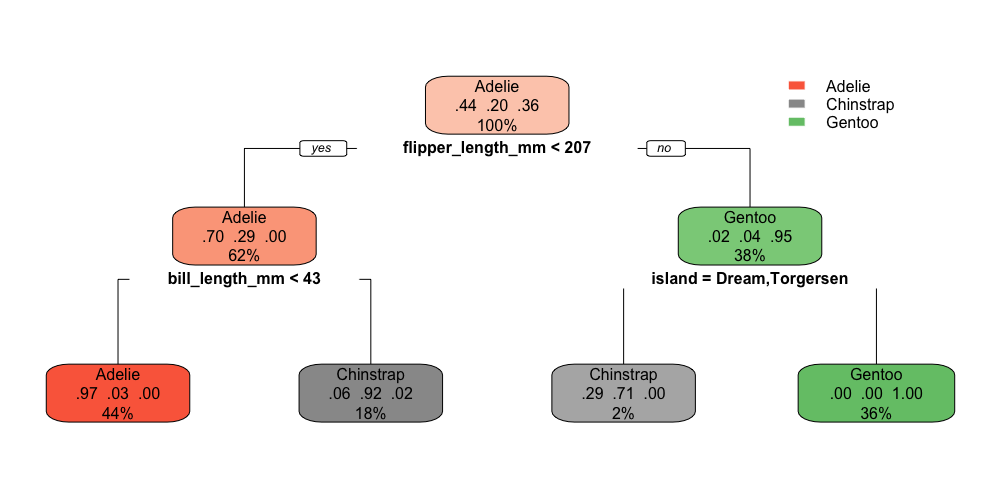
分岐情報は内部変数として持っているのでrpart:::labels.rpartでアクセスできる。
labels.rpart function - RDocumentation
「:::」はTriple Colon Operatorと呼ばれている内部変数にアクセスする演算子。
R: Double Colon and Triple Colon Operators
rpart:::labels.rpart(tree)
# [1] "root"                     "flipper_length_mm< 206.5"
# [3] "bill_length_mm< 43.35"    "bill_length_mm>=43.35"
# [5] "flipper_length_mm>=206.5" "island=bc"
# [7] "island=a"
内部でabbreviateという関数が使用されており、stringsはa,b,cといった形に省略されてしまう。今回のサンプルでもislandの分岐基準が「"island=bc" 」「"island=a”」と省略されてしまっている。
abbreviate function - RDocumentation
minlengthを0とすると省略せずに返してくれる。
rpart:::labels.rpart(tree, minlength = 0)
# [1] "root"                     "flipper_length_mm< 206.5"
# [3] "bill_length_mm< 43.35"    "bill_length_mm>=43.35"
# [5] "flipper_length_mm>=206.5" "island=Dream,Torgersen"
# [7] "island=Biscoe"
データフレームに色々まとめることもできる。
r - Extract variable labels from rpart decision tree - Stack Overflow
df_splits <- data.frame(
  splits = rpart:::labels.rpart(tree, minlength = 0),
  n = tree$frame$n,
  yval = tree$frame$yval
)

df_splits
# splits   n yval               var
# 1                     root 344    1 flipper_length_mm
# 2 flipper_length_mm< 206.5 214    1    bill_length_mm
# 3    bill_length_mm< 43.35 151    1            <leaf>
# 4    bill_length_mm>=43.35  63    2            <leaf>
# 5 flipper_length_mm>=206.5 130    3            island
# 6   island=Dream,Torgersen   7    2            <leaf>
# 7            island=Biscoe 123    3            <leaf>
ggplot2のgeom_boxplotについて備忘録
ggplot2の箱ひげ図を描く関数の備忘録。
geom_boxplot
penguinsデータで箱ひげ図を描く。
library(tidyverse)
library(palmerpenguins)
data(package = 'palmerpenguins')

df <- penguins

df %>%
  ggplot2::ggplot(ggplot2::aes(x = species, y = bill_length_mm)) +
  ggplot2::geom_boxplot()
 A box and whiskers plot (in the style of Tukey) — geom_boxplot • ggplot2
平均の線を引く
箱の真ん中の線は平均値ではなく中央値。四分位で分けるのが箱ひげ図なので、箱の上が第3四分位、下が第1四分位、真ん中が第2四分位でつまり中央値になる。
それでも平均値を描画したい場合はstat_summaryを使用する。(stat_summaryあんまり調べてないので怪しい。)
df %>%
  ggplot2::ggplot(ggplot2::aes(x = species, y = bill_length_mm)) +
  ggplot2::geom_boxplot() +
  ggplot2::stat_summary(fun = mean, geom = "errorbar", aes(ymax = ..y.., ymin = ..y..), width = 0.75, size = 1, linetype = "dotted")
 r - How do I plot the mean instead of the median with geom_boxplot? - Stack Overflow
ひげの先端を最大値最小値にする
ひげの先端が何を表しているのかは決まっている訳ではないらしい。
geom_boxplotはデフォルトでは箱の端からIQRの1.5倍内の最小最大がひげの先端になる。
ひげより先にある点は外れ値と解釈される。IQRとはInterquartile Rangeの略で、第3四分位数から第1四分位数を引いたもの。
四分位範囲 | 統計用語集 | 統計WEB
一方で、ひげの先端を最大値最小値として説明している場合もある。
4-2. 箱ひげ図の見方 | 統計学の時間 | 統計WEB
geom_boxplotのひげの先端を最大値最小値にするには、ひげの長さを調整するcoefという引数に値を設定する。coefに設定した数値がIQRに掛けられた結果がひげの長さになる。デフォルトは1.5。
適当に大きな数値を設定すれば最大値最小値が先端になるが、なんか違う気がする……。
df %>%
  ggplot2::ggplot(ggplot2::aes(x = species, y = bill_length_mm)) +
  ggplot2::geom_boxplot(coef = 1000)

箱の並び替え
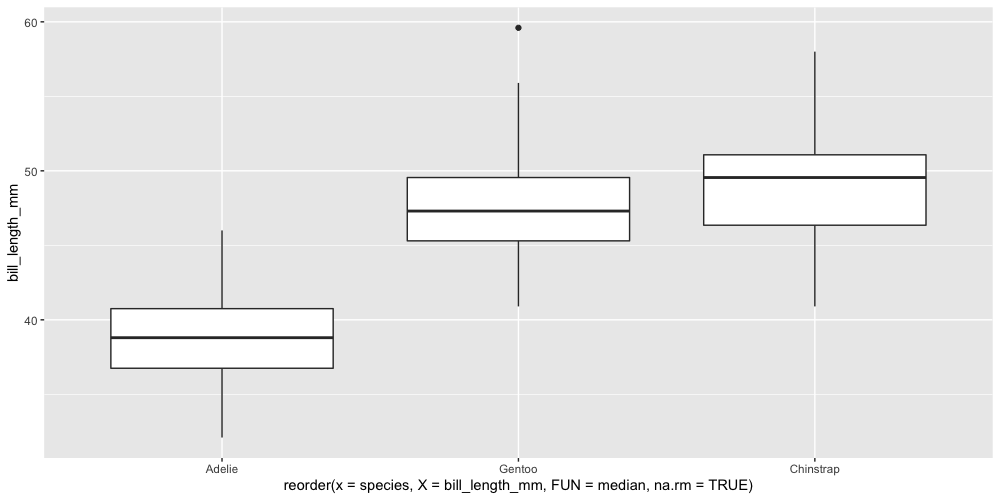
並び替えはreorderを使う。箱ひげ図の真ん中の線である中央値で並び替える場合が多いはず。
df %>%
  dplyr::filter(!is.na(bill_length_mm)) %>%
  ggplot2::ggplot(ggplot2::aes(x = reorder(x = species, X = bill_length_mm, FUN = median), y = bill_length_mm)) +
  ggplot2::geom_boxplot()
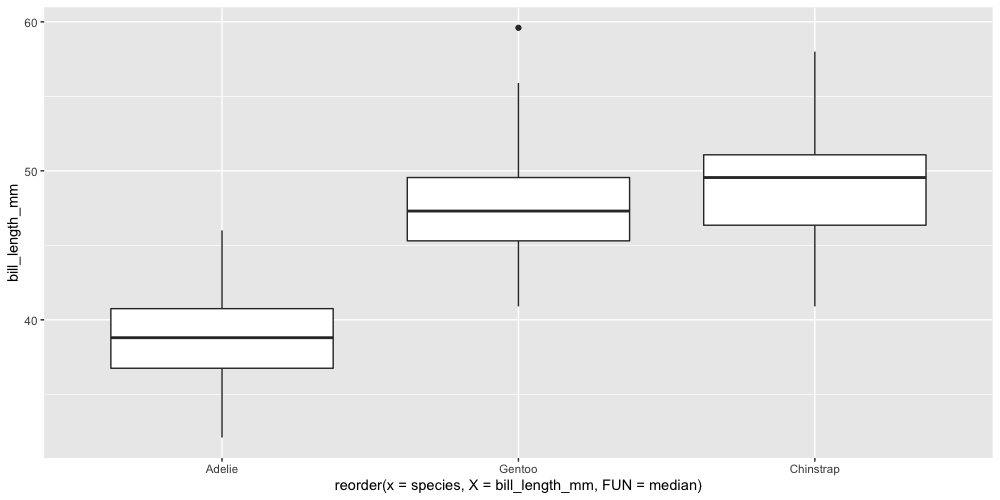
ここではdplyr::filterでNAを除外しているが、除外しないとこうなる。
df %>%
  ggplot2::ggplot(ggplot2::aes(x = reorder(x = species, X = bill_length_mm, FUN = median), y = bill_length_mm)) +
  ggplot2::geom_boxplot()

並び替えられていない。これはreorderのmedianがNAを除外していないため、集計結果がNAになってしまって並び替えが機能していない。
先のようにdplyr::filterで除外するか、もしくはreorderが...(dot-dot-dot)でFUNに引数を渡せるのでna.rm=TRUEを設定する。
… optional: extra arguments supplied to FUN
reorder.default function - RDocumentation
df %>%
  ggplot2::ggplot(ggplot2::aes(x = reorder(x = species, X = bill_length_mm, FUN = median, na.rm = TRUE), y = bill_length_mm)) +
  ggplot2::geom_boxplot()